Skip to Main Content Skip to Navigation


Loading...


Loading...

SUNY Poly Logo Image. SUNY Poly Logo Image.
  • Home
  • Groups
  • Events
  • News
  • Groups
  • Events
  • News
  • Sign In
Top of Main Content

Subscribe to Calendars

ICS Feeds Outlook 2010 Apple iCal Outlook 365 Web Google Calendar iPhone/iPad Learn More
Export the campusgroups.com calendars to a number of "ICS" supported calendars including Google Calendar, Outlook, iCal, etc. The calendar feeds are updated every time an event is added or updated.
Your Personal Feed of Events
Please sign in to see your Favorite Events ICS feed.

School-wide Calendar
The SUNY Poly Calendar of Events (all public events from all groups) Outlook Icon Outlook Google Icon Google Apple ICAL Icon iCal Copy Link Icon Copy Link

Group Calendars
  • Starring a group calendar will add all its events to your Personal Feed (see above).
  • If you are a member of the group, the feed will contain public AND members-only events.
  • If you are an officer of the group, the feed will contain ALL upcoming events listed in your manage section.
SUNY Poly Office of Research
Staff Department
Outlook Icon Outlook Google Icon Google Apple ICAL Icon iCal Copy Link Icon Copy Link
Adirondack Residence Hall
Residence Life
Outlook Icon Outlook Google Icon Google Apple ICAL Icon iCal Copy Link Icon Copy Link
Advancing Completion through Engagement
Staff Department
Outlook Icon Outlook Google Icon Google Apple ICAL Icon iCal Copy Link Icon Copy Link
American Society of Civil Engineers Student Chapter
Student Club
Outlook Icon Outlook Google Icon Google Apple ICAL Icon iCal Copy Link Icon Copy Link
American Society of Mechanical Engineers Student Section
Student Club
Outlook Icon Outlook Google Icon Google Apple ICAL Icon iCal Copy Link Icon Copy Link
Artificial Intelligence Exploration Center
Academic Departments
Outlook Icon Outlook Google Icon Google Apple ICAL Icon iCal Copy Link Icon Copy Link
Badminton Club
Student Club
Outlook Icon Outlook Google Icon Google Apple ICAL Icon iCal Copy Link Icon Copy Link
Casual Debate Club
Student Club
Outlook Icon Outlook Google Icon Google Apple ICAL Icon iCal Copy Link Icon Copy Link
Center for Student Involvement
Staff Department
Outlook Icon Outlook Google Icon Google Apple ICAL Icon iCal Copy Link Icon Copy Link
Club Advisory Board
Student Organizations
Outlook Icon Outlook Google Icon Google Apple ICAL Icon iCal Copy Link Icon Copy Link
Collegiate Science and Technology Entry Program
Staff Department
Outlook Icon Outlook Google Icon Google Apple ICAL Icon iCal Copy Link Icon Copy Link
Commuter Student Association
Staff Department
Outlook Icon Outlook Google Icon Google Apple ICAL Icon iCal Copy Link Icon Copy Link
Computer Science Club
Student Club
Outlook Icon Outlook Google Icon Google Apple ICAL Icon iCal Copy Link Icon Copy Link
Creativity Club
Student Club
Outlook Icon Outlook Google Icon Google Apple ICAL Icon iCal Copy Link Icon Copy Link
Curling Club 2.0
Student Club
Outlook Icon Outlook Google Icon Google Apple ICAL Icon iCal Copy Link Icon Copy Link
Cybersecurity Club
Student Club
Outlook Icon Outlook Google Icon Google Apple ICAL Icon iCal Copy Link Icon Copy Link
Dance Club
Student Club
Outlook Icon Outlook Google Icon Google Apple ICAL Icon iCal Copy Link Icon Copy Link
Dean of Students Office
Staff Department
Outlook Icon Outlook Google Icon Google Apple ICAL Icon iCal Copy Link Icon Copy Link
Design and Develop Club
Student Club
Outlook Icon Outlook Google Icon Google Apple ICAL Icon iCal Copy Link Icon Copy Link
Diversity, Equity, Inclusion, and Belonging
Staff Department
Outlook Icon Outlook Google Icon Google Apple ICAL Icon iCal Copy Link Icon Copy Link
Drone Club
Student Club
Outlook Icon Outlook Google Icon Google Apple ICAL Icon iCal Copy Link Icon Copy Link
Educational Opportunity Program
Staff Department
Outlook Icon Outlook Google Icon Google Apple ICAL Icon iCal Copy Link Icon Copy Link
Environmental Sustainability Club
Student Club
Outlook Icon Outlook Google Icon Google Apple ICAL Icon iCal Copy Link Icon Copy Link
Financial Technology
Student Club
Outlook Icon Outlook Google Icon Google Apple ICAL Icon iCal Copy Link Icon Copy Link
FIRST Robotics Mentoring Club
Student Club
Outlook Icon Outlook Google Icon Google Apple ICAL Icon iCal Copy Link Icon Copy Link
Flag Football Club
Student Club
Outlook Icon Outlook Google Icon Google Apple ICAL Icon iCal Copy Link Icon Copy Link
Gannett Gallery
Staff Department
Outlook Icon Outlook Google Icon Google Apple ICAL Icon iCal Copy Link Icon Copy Link
Global Programs/Study Abroad
Staff Department
Outlook Icon Outlook Google Icon Google Apple ICAL Icon iCal Copy Link Icon Copy Link
Graduate Admissions - SUNY Poly
Staff Department
Outlook Icon Outlook Google Icon Google Apple ICAL Icon iCal Copy Link Icon Copy Link
Hilltop Residence Hall
Residence Life
Outlook Icon Outlook Google Icon Google Apple ICAL Icon iCal Copy Link Icon Copy Link
Home Page
Staff Department
Outlook Icon Outlook Google Icon Google Apple ICAL Icon iCal Copy Link Icon Copy Link
i love Lauren
Student Club
Outlook Icon Outlook Google Icon Google Apple ICAL Icon iCal Copy Link Icon Copy Link
Improv Club
Student Club
Outlook Icon Outlook Google Icon Google Apple ICAL Icon iCal Copy Link Icon Copy Link
Institute of Electrical and Electronics Engineers
Student Club
Outlook Icon Outlook Google Icon Google Apple ICAL Icon iCal Copy Link Icon Copy Link
Institute of Transportation Engineers Student Chapter
Student Club
Outlook Icon Outlook Google Icon Google Apple ICAL Icon iCal Copy Link Icon Copy Link
INTERNATIONAL STUDENT CLUB
Student Club
Outlook Icon Outlook Google Icon Google Apple ICAL Icon iCal Copy Link Icon Copy Link
International Student Services
Staff Department
Outlook Icon Outlook Google Icon Google Apple ICAL Icon iCal Copy Link Icon Copy Link
InterVarsity Christian Fellowship
Student Club
Outlook Icon Outlook Google Icon Google Apple ICAL Icon iCal Copy Link Icon Copy Link
Learning Center at SUNY Poly
Staff Department
Outlook Icon Outlook Google Icon Google Apple ICAL Icon iCal Copy Link Icon Copy Link
Magic the Gathering Club
Student Club
Outlook Icon Outlook Google Icon Google Apple ICAL Icon iCal Copy Link Icon Copy Link
Mohawk Residence Hall
Residence Life
Outlook Icon Outlook Google Icon Google Apple ICAL Icon iCal Copy Link Icon Copy Link
Multicultural Affairs
Staff Department
Outlook Icon Outlook Google Icon Google Apple ICAL Icon iCal Copy Link Icon Copy Link
Multicultural Student Union
Student Club
Outlook Icon Outlook Google Icon Google Apple ICAL Icon iCal Copy Link Icon Copy Link
Muslim Students’ Association of SUNY Polytechnic Institute
Student Club
Outlook Icon Outlook Google Icon Google Apple ICAL Icon iCal Copy Link Icon Copy Link
New Student Orientation
Staff Department
Outlook Icon Outlook Google Icon Google Apple ICAL Icon iCal Copy Link Icon Copy Link
Oceans Chapel Plugged Club
Student Club
Outlook Icon Outlook Google Icon Google Apple ICAL Icon iCal Copy Link Icon Copy Link
Office of the President
Staff Department
Outlook Icon Outlook Google Icon Google Apple ICAL Icon iCal Copy Link Icon Copy Link
Office of the Provost
Staff Department
Outlook Icon Outlook Google Icon Google Apple ICAL Icon iCal Copy Link Icon Copy Link
Oriskany Residence Hall
Residence Life
Outlook Icon Outlook Google Icon Google Apple ICAL Icon iCal Copy Link Icon Copy Link
Peter J. Cayan Library
Staff Department
Outlook Icon Outlook Google Icon Google Apple ICAL Icon iCal Copy Link Icon Copy Link
Poly Pantry
Staff Department
Outlook Icon Outlook Google Icon Google Apple ICAL Icon iCal Copy Link Icon Copy Link
Poly Pride
Student Club
Outlook Icon Outlook Google Icon Google Apple ICAL Icon iCal Copy Link Icon Copy Link
Poly Puzzlers
Student Club
Outlook Icon Outlook Google Icon Google Apple ICAL Icon iCal Copy Link Icon Copy Link
Pool Club
Student Club
Outlook Icon Outlook Google Icon Google Apple ICAL Icon iCal Copy Link Icon Copy Link
Pre-Health Club
Student Club
Outlook Icon Outlook Google Icon Google Apple ICAL Icon iCal Copy Link Icon Copy Link
Psychology and Sociology Club
Student Club
Outlook Icon Outlook Google Icon Google Apple ICAL Icon iCal Copy Link Icon Copy Link
Residential Life and Housing
Residence Life
Outlook Icon Outlook Google Icon Google Apple ICAL Icon iCal Copy Link Icon Copy Link
Robotics Club
Student Club
Outlook Icon Outlook Google Icon Google Apple ICAL Icon iCal Copy Link Icon Copy Link
S-STEM Club
Student Club
Outlook Icon Outlook Google Icon Google Apple ICAL Icon iCal Copy Link Icon Copy Link
Sim Racing
Student Club
Outlook Icon Outlook Google Icon Google Apple ICAL Icon iCal Copy Link Icon Copy Link
Skateboard Club
Student Club
Outlook Icon Outlook Google Icon Google Apple ICAL Icon iCal Copy Link Icon Copy Link
Ski Club
Student Club
Outlook Icon Outlook Google Icon Google Apple ICAL Icon iCal Copy Link Icon Copy Link
Society of Automotive Engineers Baja Club
Student Club
Outlook Icon Outlook Google Icon Google Apple ICAL Icon iCal Copy Link Icon Copy Link
Student Accessibility Services
Staff Department
Outlook Icon Outlook Google Icon Google Apple ICAL Icon iCal Copy Link Icon Copy Link
Student Government at Utica
Outlook Icon Outlook Google Icon Google Apple ICAL Icon iCal Copy Link Icon Copy Link
Student Success
Staff Department
Outlook Icon Outlook Google Icon Google Apple ICAL Icon iCal Copy Link Icon Copy Link
SUNY Poly Alumni Office
Staff Department
Outlook Icon Outlook Google Icon Google Apple ICAL Icon iCal Copy Link Icon Copy Link
SUNY Poly Game Design Club
Student Club
Outlook Icon Outlook Google Icon Google Apple ICAL Icon iCal Copy Link Icon Copy Link
SUNY Poly Live
Student Club
Outlook Icon Outlook Google Icon Google Apple ICAL Icon iCal Copy Link Icon Copy Link
SUNY Poly Mountain Biking Club
Student Club
Outlook Icon Outlook Google Icon Google Apple ICAL Icon iCal Copy Link Icon Copy Link
Suny Poly Outdoors Club
Student Club
Outlook Icon Outlook Google Icon Google Apple ICAL Icon iCal Copy Link Icon Copy Link
SUNY Poly Soccer Club
Student Club
Outlook Icon Outlook Google Icon Google Apple ICAL Icon iCal Copy Link Icon Copy Link
SUNY Poly Spotlight Series
Staff Department
Outlook Icon Outlook Google Icon Google Apple ICAL Icon iCal Copy Link Icon Copy Link
SUNY Poly Student Affairs and Dean of Students Office
Staff Department
Outlook Icon Outlook Google Icon Google Apple ICAL Icon iCal Copy Link Icon Copy Link
SUNY Poly Ultimate Frisbee Club
Student Club
Outlook Icon Outlook Google Icon Google Apple ICAL Icon iCal Copy Link Icon Copy Link
SUNY Poly Wildcat Athletics
Staff Department
Outlook Icon Outlook Google Icon Google Apple ICAL Icon iCal Copy Link Icon Copy Link
SUNY Poly's Title IX Office
Staff Department
Outlook Icon Outlook Google Icon Google Apple ICAL Icon iCal Copy Link Icon Copy Link
Tabletop Club
Student Club
Outlook Icon Outlook Google Icon Google Apple ICAL Icon iCal Copy Link Icon Copy Link
The Wildcat Den
Staff Department
Outlook Icon Outlook Google Icon Google Apple ICAL Icon iCal Copy Link Icon Copy Link
Trading Card Game Club
Student Club
Outlook Icon Outlook Google Icon Google Apple ICAL Icon iCal Copy Link Icon Copy Link
Undergraduate Admmissions
Staff Department
Outlook Icon Outlook Google Icon Google Apple ICAL Icon iCal Copy Link Icon Copy Link
University Marketing and Communications Office
Staff Department
Outlook Icon Outlook Google Icon Google Apple ICAL Icon iCal Copy Link Icon Copy Link
Volleyball Club
Student Club
Outlook Icon Outlook Google Icon Google Apple ICAL Icon iCal Copy Link Icon Copy Link
Wellness Center
Staff Department
Outlook Icon Outlook Google Icon Google Apple ICAL Icon iCal Copy Link Icon Copy Link
Wildcat Esports
Student Organizations
Outlook Icon Outlook Google Icon Google Apple ICAL Icon iCal Copy Link Icon Copy Link
Wildcat Events Board
Student Organizations
Outlook Icon Outlook Google Icon Google Apple ICAL Icon iCal Copy Link Icon Copy Link
Wildcat Fluid Power Club
Student Club
Outlook Icon Outlook Google Icon Google Apple ICAL Icon iCal Copy Link Icon Copy Link
Wildcat Media
Student Organizations
Outlook Icon Outlook Google Icon Google Apple ICAL Icon iCal Copy Link Icon Copy Link
Wildcats Chess Club
Student Club
Outlook Icon Outlook Google Icon Google Apple ICAL Icon iCal Copy Link Icon Copy Link
Women in Engineering
Student Club
Outlook Icon Outlook Google Icon Google Apple ICAL Icon iCal Copy Link Icon Copy Link
Workforce Development
Staff Department
Outlook Icon Outlook Google Icon Google Apple ICAL Icon iCal Copy Link Icon Copy Link
Event calendar with a star
Benefits of Subscribing to Calendars
  • View your events in your personal calendar (i.e. Outlook, Google Calendar, iCal, iPhone Agenda, Android, etc).
  • When a group modifies an event, it is automatically updated in your personal calendar.
  • Receive event reminders (right now, this can only be achieved by subscribing from your iPhone/iPad).


Why should you star events in CampusGroups/Ready Campus?
  • Save time - When you star an event, it is automatically added to your personal calendar in 1 click.
  • Customize your list of events - As opposed to the Group Calendar Feeds, your Favorite Events feed allows you to select the events you are interested in, and to only have these events added to your calendar.
  • Know when changes happen - We notify you when an event you starred was modified or cancelled.

There are 2 types of ICS feeds in the platform:
(1) Group calendar feeds: containing all public events of a group (go to the Calendar and click on Subscribe to Calendars to access these feeds)
(2) Your personal feed of events: containing all events that you "Starred" + All the events of the group calendars you starred


We recommend that you subscribe to your ICS feeds from your Outlook Desktop. Any change made to an event will be automatically and instantaneously updated on your calendar.

Limitation:
You will not receive any event reminders unless you manually copy your events from your ICS subscription into your personal calendar.

Solution:
* If you have an iPhone/iPad, also subscribe to your ICS from your Mobile
* If you have a Android, connect CampusGroups/Ready Campus to your Google Account and your events will automatically appear in your Google Calendar on the Web and on your phone

How to subscribe to an ICS feed into your Outlook Calendar

1) Click on the Copy Link link and copy the ICS URL.

2) In Outlook, on the Tools menu, click Account Settings.

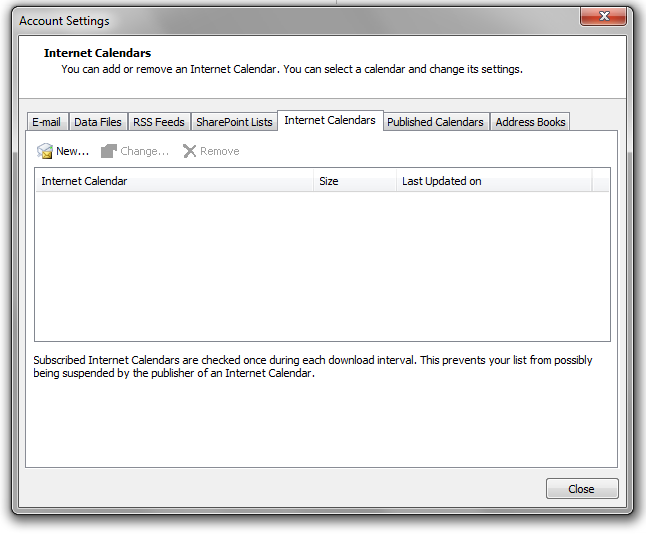
3) On the Internet Calendars tab, click New.

Windows Account settings, Internet Calendars Dialog Image
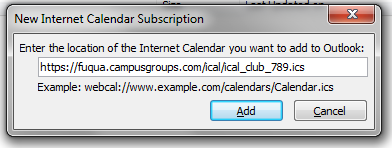
4) Paste the URL you copied in step 3. Click Add.

Windows New Internet Calendar Subscription Popup Image

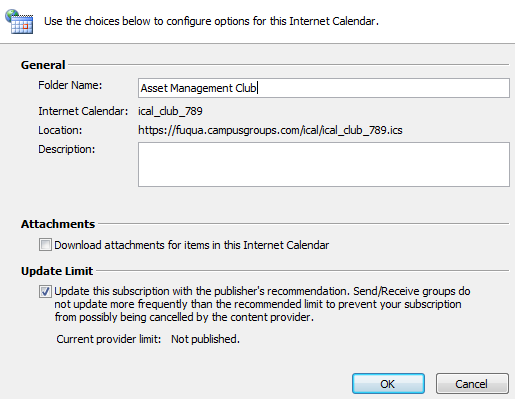
5) In the Folder Name box, type the name of the calendar as you want it to appear in Outlook, and then click OK.

Windows Internet Calendar Configuration Dialog Image

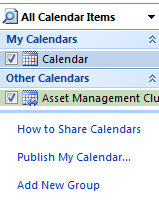
6) Click ok. You should see your new calendar on the left of your Outlook:

Windows All Calendar Items Top Left Snippet Screenshot

We recommend that you subscribe to your CampusGroups/Ready Campus ICS feeds from your Apple iCal app on your Mac. Any change made to an event will be automatically and instantaneously updated on your calendar.

Limitation:
You will not receive any event reminders unless you manually copy your events from your ICS subscription into your personal calendar.

Solution:
* If you have an iPhone/iPad, also subscribe to your ICS from your Mobile
* If you have a Android, connect CampusGroups to your Google Account and your events will automatically appear in your Google Calendar on the Web and on your phone

How to subscribe to an ICS feed from your iCal Calendar

1) Copy the iCalLink URL under the "ICS Feeds" tab of this popup.

2) In iCal, on the Files menu, click on New Calendar Subscription.

3) Paste the URL you copied in step 1. Click Subscribe.


Your ICS subscriptions will appear in your Outlook.com account and will also appear on your mobile as long as you have connected your Mobile with your Outlook account.

Limitation:
Your ICS subscription will only be updated every 3 hours and will not allow you to receive reminders.

How to subscribe to a ICS feed from Outlook Calendar:

1) Click on the Link link and copy the ICS URL for the calendar you wish to add.

2) Open a new tab in your browser and go to outlook.com for sunypoly and sign in with your NetID and password.

3) Click on the Calendar link in the O365 Ribbon

Office 365 Calendar Screenshot 1

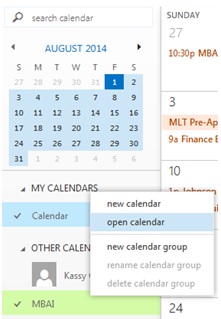
4) Right Click on My Calendars and select open calendar from the context menu
Office 365 Calendar Screenshot 2

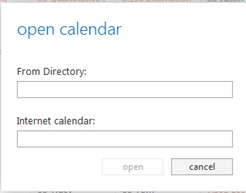
5) Paste the calendar URL into the Internet calendar: box and click the open button.
Office 365 Calendar Screenshot 3

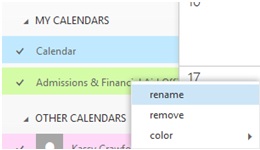
6) Back in the Calendar view, expand My Calendars. Right click the newly added calendar and choose Rename. Choose a name that reflects how you want to view the calendar. This change will be reflected on all your personal devices
Office 365 Calendar Screenshot 4

Your ICS subscriptions will appear in your Google Calendar account and will also appear on your mobile as long as you have connected your Mobile with your Google account.

Limitation:
Your ICS subscription will only be updated every 12 hours and will not allow you to receive reminders. This is a known issue which Google has not yet decided to resolve.


How to subscribe to an ICS feed from your Google Calendar:

I] First Method

1) Click on the Google Calendar link of the group which calendar you want to export.

Google Calendar Screenshot 1

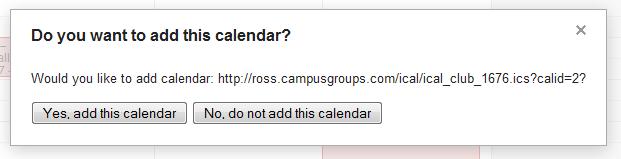
2) In the new tab, choose Yes, add this calendar

Google Calendar Screenshot 2

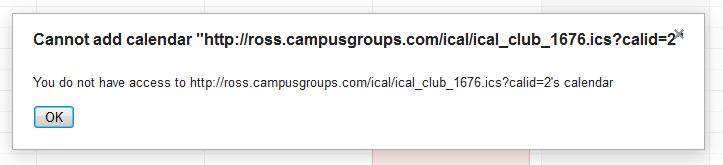
Your Google Calendar should now be updated. But sometimes, depending of the configuration, you are not allowed to add the calendar and you see this screen:

Google Calendar Screenshot 3

This is due to a conflict between Google Calendar and your browser. You can try to update your browser, or even better for this widget, use Google Chrome. Or follow the second method.

II] Second Method

1) Copy the link of the "Cannot add" message, then click OK.

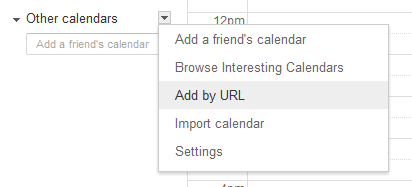
2) Go to Google Calendar. Click on the triangle next to Add in the "Other Calendars" section (bottom left of the screen) and select Add by URL.

Google Calendar Screenshot 4

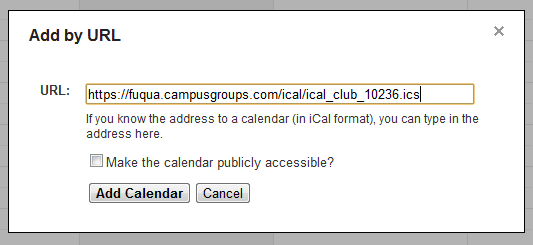
3) A window will pop up asking for the URL of the calendar. Paste the link you copied on step 2 and click on Add Calendar.

Google Calendar Screenshot 5

4) The events of the selected group will show up on your calendar and they will get updated just as they are on the platform.

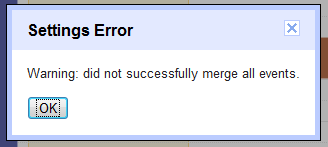
We have noticed that after Step #3 some Users may sometimes get the following Error Message

Google Calendar Screenshot 6
If this happens to you, just repeat instantly Steps 4 and 5 and you should be fine.

This is a great way to subscribe to any CampusGroups/Ready Campus ICS feeds from your iPhone/iPad, and to also get Reminders/Alerts 15mn before the event.

Once you have set up your calendar subscription:
1) Adding a "Star" to an event will automatically and instantaneously add this event into your mobile calendar and reminder.
2) Modifications to any of your events (i.e. date/time, location, etc), will be automatically replicated on your mobile calendar.
3) You will also be notified in the platform when changes to events occur.

How to synchronize CampusGroups/Ready Campus ICS feeds with an iOS device

1) Open the Settings application on your device's home screen

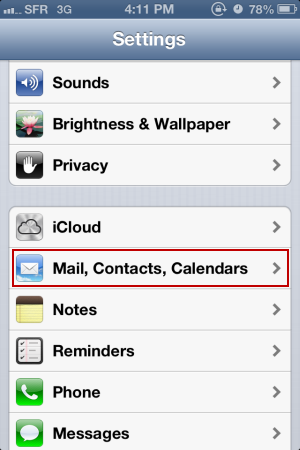
2) Open Mail, Contacts, Calendars

iPhone Calendar Setup Screenshot 1

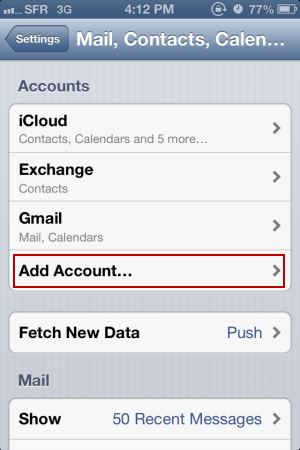
3) Select Add Acount...

iPhone Calendar Setup Screenshot 2

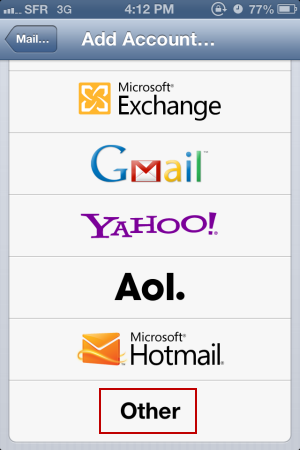
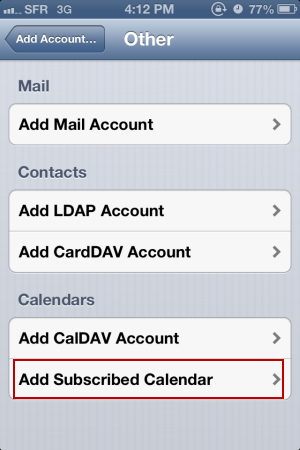
4) Select Other

iPhone Calendar Setup Screenshot 3

5) Select Add Subscribed Calendar

iPhone Calendar Setup Screenshot 4

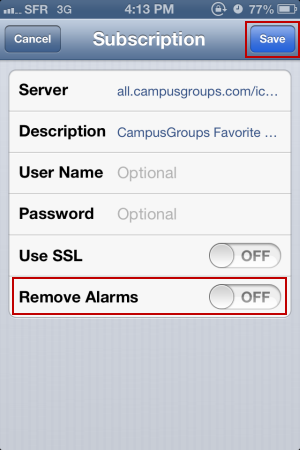
6) In the Server field, enter your ICS feed URL (.ics)

7) Leave the Remove Alarms to "Off" and click Save

iPhone Calendar Setup Screenshot 5

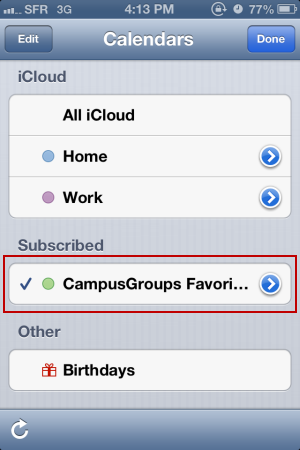
8) Open your Agenda App from the home screen of your device and click on Calendars. Make sure that you new ICS subscription is there and checked. You can select a color for your new subscription.

iPhone Calendar Setup Screenshot 6

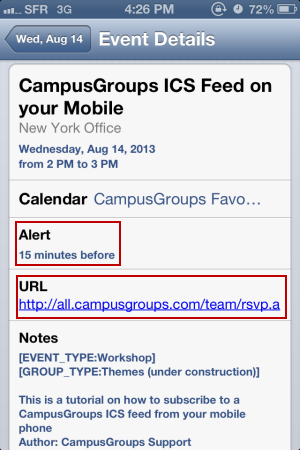
9) On your Agenda App, if you click on an event, you can see all Event Details

iPhone Calendar Setup Screenshot 7


You will receive a notification/alarm on your device 15 minutes before an event.
SUNY Poly Website Logo

Contact

SUNY Poly
100 Seymour Road
Utica, New York 13502
United States

csi@sunypoly.edu

Links

Home
Groups
Events
News
Support Center
©2026 Ready Education
Archived records can be found by switching the status filter from Active to Archived.
Auto submit on change.
Note: changing the start time may automatically update other time fields on the page
Note: changing the end time may automatically update other time fields on the page
Note: changing the timezone may automatically update other time fields on the page
Chat
Open the group website in a new tab.
This action permanently removes the record and cannot be undone.
Download
Press Enter or Space to grab or drop items, arrow keys to move, escape to restore original position, and Ctrl plus Enter or Space to add items to top of active menu.
Creates a duplicate record and adds COPY to the title in parentheses.
Enables edit and delete options
Press escape to collapse and exit the dropdown.
Expandable sub-menu.
This will take immediate action and reload the page.
Making a selection will automatically save the new status.
Making a selection will automatically add the tag.
New tab
Opens the email builder for the selected groups.
Opens the default email client.
Paste emails in the text box separated by a line or a comma.
Reloads page and filters by this entry
Stop following
This checklist cannot be deleted because it is used for a Group Registration or Group Re-Registration approval process.
Changing the selection will reload the page
Changing the selection will update the form
Changing the selection will update the page
Changing the selection will update the row
Click to get the next slides then shift-tab back to the slide deck.
Click to get the previous slides then tab forward.
Stop following
Moves this record back into the Active status.
Use arrow keys
Video conferencing link, new tab.
View my entire calendar or schedule.
Opens member profile
You are attending this event.